Permissions & Postgresql
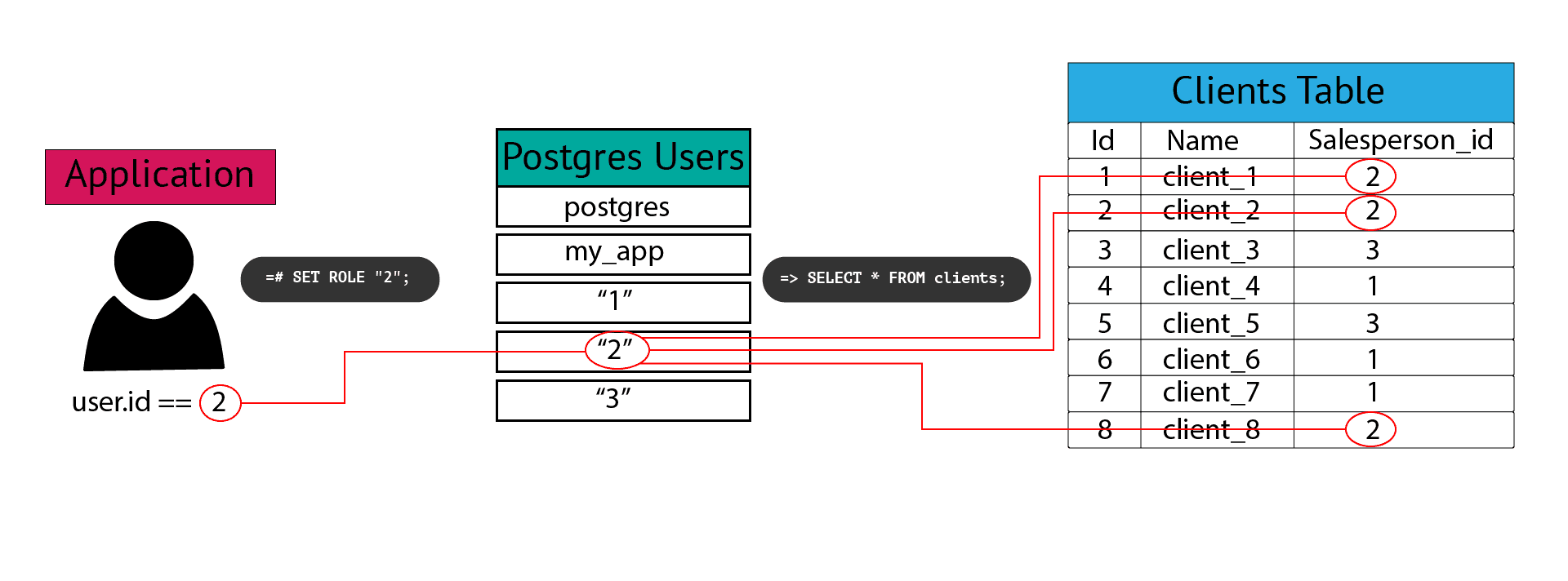
Using Postgres Row-Level Security in Python and Django:
Postgres introduced row-level security in 2016 to give database administrators a way to limit the rows a user can access, adding an extra layer of data protection. What’s nice about RLS is that if a user tries to select or alter a row they don’t have access to, their query will return 0 rows, rather than throwing a permissions error. This way, a user can use select * from table_name, and they will only receive the rows they have access to with no knowledge of rows they don’t.
How to Use Postgres Row-Level Security in Django Now, how can we translate this to a Django application?
First, we will need to create a database user for each app user we create. One way to accomplish this would be to override the save method on the Salesperson model, but this is a great opportunity to take advantage of Django signals , so we’ll create a signal that creates the database user after a new salesperson is saved.
Next, we’ll have to figure out how to switch to the correct user when a salesperson logs in. For this, we can use a middleware that gets the salesperson_id and sets the role in the database.
Models Our models reflect exactly what we set up in our earlier database example. Here I chose to make Salesperson a proxy of Django’s built-in User model, but this is not required.
from django.db import models
from django.contrib.auth.models import User

class Salesperson(User):
    class Meta:
        proxy = True

class Client(models.Model):
    name = models.CharField(max_length=50)
    Salesperson = models.ForeignKey(Employee, on_delete=models.CASCADE)
Django Signals: Creating Our Database User We want to create a new database user every time a new salesperson record is created. We can use Django signals to execute some code after a new record is saved. If you’re not familiar with signals, the Django docs on this topic are easy to understand. If this piqued your interest, this article goes into more detail.
Here is the code for the signal itself, but you’ll have to reference the above article to get it registered in your app:
    from .models import Salesperson
    from django.db.models.signals import post_save
    from django.db import connection

    def create_db_user(sender, instance, created, **kwargs):
        if created:
            user_id = instance.id
            with connection.cursor() as cursor:
                cursor.execute(f'CREATE ROLE "{user_id}"')
                cursor.execute(f'GRANT salespeople TO "{user_id}"')

post_save.connect(create_db_user, sender=Salesperson)
The post_save signal can take a named argument created, which is a boolean. This avoids running the code every time we update the record and ensures it will only run when we create a new salesperson. From there, we can get the user id from the instance and use django.db.connection to run our SQL to create the role and grant permissions.
It’s very important to note that if you want to use Django’s built-in User model and the authentication that comes with it, you’ll need to grant salesperson permissions on the django_admin_log and auth_user tables. That’s why it’s so helpful to have this parent role that all individual users inherit from.
Django Middleware: Setting Current User Now, we can write a middleware to switch the database user to the current application user making the request.
    from django.db import connection

    class RlsMiddleware(object):
        def __init__ (self, get_response):
            self.get_response = get_response

        def __call__ (self, request):
            user_id = request.user.id
            with connection.cursor() as cursor:
                cursor.execute(f'SET ROLE "{user_id}" ')

            response = self.get_response(request)
            return response
We get the user id from the request object. After that, the code looks pretty similar to our signal. We use the Django db connection again to set the role to the corresponding database user, which should match the application user’s id. Don’t forget to register your middleware in settings.py.
Now we can use all of Django’s built-in query methods while maintaining row-level security in Postgres. What is particularly cool is that, with the role set, all we need to do to get all of a salesperson’s clients is call Client.objects.all(), and we can be sure that only the clients related to the salesperson will be returned. If a salesperson tries to query for a client that doesn’t belong to them, they’ll get zero results.