Object literals
An object is a collection of properties, and a property is an association between a name (or key) and a value. A property’s value can be a function, in which case the property is known as a method. In addition to objects that are predefined in the browser, you can define your own objects.
decleration :
  var myCar = {
        make: 'Ford',
        model: 'Mustang',
        year: 1969
            }
Using a constructor function Alternatively, you can create an object with these two steps:
Define the object type by writing a constructor function. There is a strong convention, with good reason, to use a capital initial letter. Create an instance of the object with new. To define an object type, create a function for the object type that specifies its name, properties, and methods. For example, suppose you want to create an object type for cars. You want this type of object to be called Car, and you want it to have properties for make, model, and year. To do this, you would write the following function:
          function Car(make, model, year) {
                      this.make = make;
                      this.model = model;
                      this.year = year;
                               } Notice the use of this to assign values to the object's properties based on the values passed to the function.
Now you can create an object called mycar as follows: var mycar = new Car('Eagle', 'Talon TSi', 1993);
Document Object Model also known as DOM
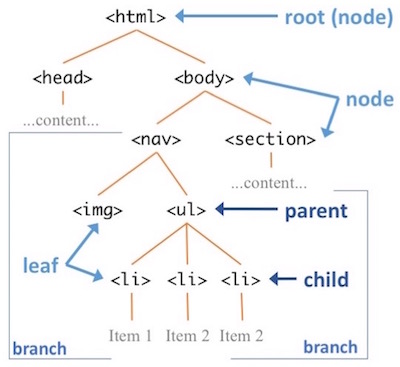
The name “Document Object Model” was chosen because it is an “object model” is used in the traditional object oriented design sense: documents are modeled using objects, and the model encompasses not only the structure of a document, but also the behavior of a document and the objects of which it is composed. In other words, the nodes in the above diagram do not represent a data structure, they represent objects, which have functions and identity.
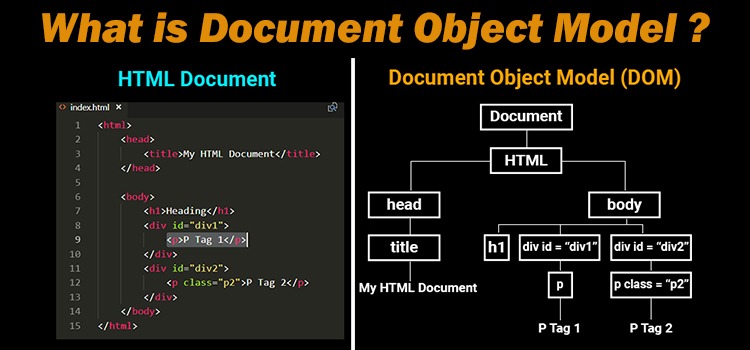
JavaScript interacts with HTML document indirectly by interacting with the DOM. With the document object model, JavaScript gets all the power it needs to create dynamic HTML:
- JavaScript can change all the HTML elements in the page
- JavaScript can change all the HTML attributes in the page
- JavaScript can change all the CSS styles in the page
- JavaScript can remove existing HTML elements and attributes
- JavaScript can add new HTML elements and attributes
- JavaScript can react to all existing HTML events in the page
- JavaScript can create new HTML events in the page
In our code will follow the following tree structure of DOM that helps to decleare append child for each element